In our last blog post, we explained why we cancelled our initial plans for native iOS and Android apps and outlined our new strategy moving forward.
Today, it is my great pleasure to announce that the first Sownloader extensions are now available for download on Google Chrome, Microsoft Edge, Mozilla Firefox and Mozilla Firefox on Android!
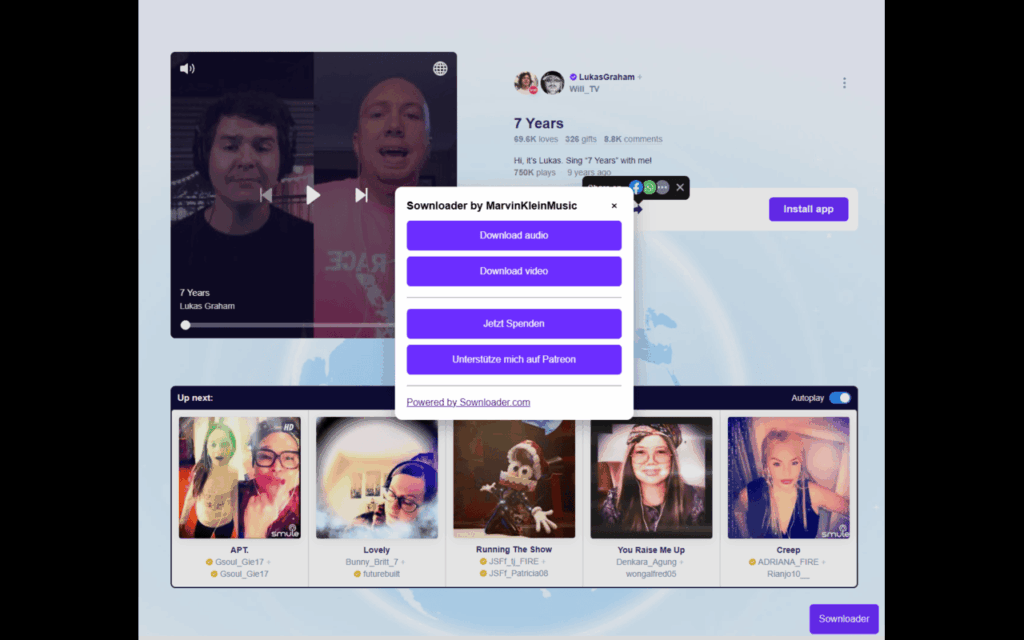
Integrated Sownloader extension
With this extension, you’ll find a dedicated Sownloader button directly on the Smule website. Once you click it, the extension fetches the performance details and allows you to download either the audio or the video.
To download your songs on Android you’ll need the official Mozilla Firefox browser for Android with the Sownloader extension installed. Here is a short video demonstrating how you can download on Android.
Of course, we haven’t forgotten about an extension for macOS and iOS. This version still needs a bit more development and will be available shortly. Here is a first look on the iOS extension.
It’s been a while since I posted the last development update. Since then, a lot has been happening behind the scenes. I was close to finishing the native iOS app, but Smule rolled out Cloudflare protection across their entire website, which now prevents third-party apps and websites from fetching any data. While this is intended to block bots, it also negatively impacts scripts that rely on accessing the webpage to retrieve information.
This is also the reason why Sownloader Web is no longer working. Unfortunately there is nothing I can do about this right now.
Therefore, I have canceled the native app approach and started working on a different solution. The only reliable way to fetch performance details now is to initiate the process through the official website. But how do we do this? It turns out this can be achieved with a simple browser extension that injects additional features into the page.
I already got a working prototype for Google Chrome.
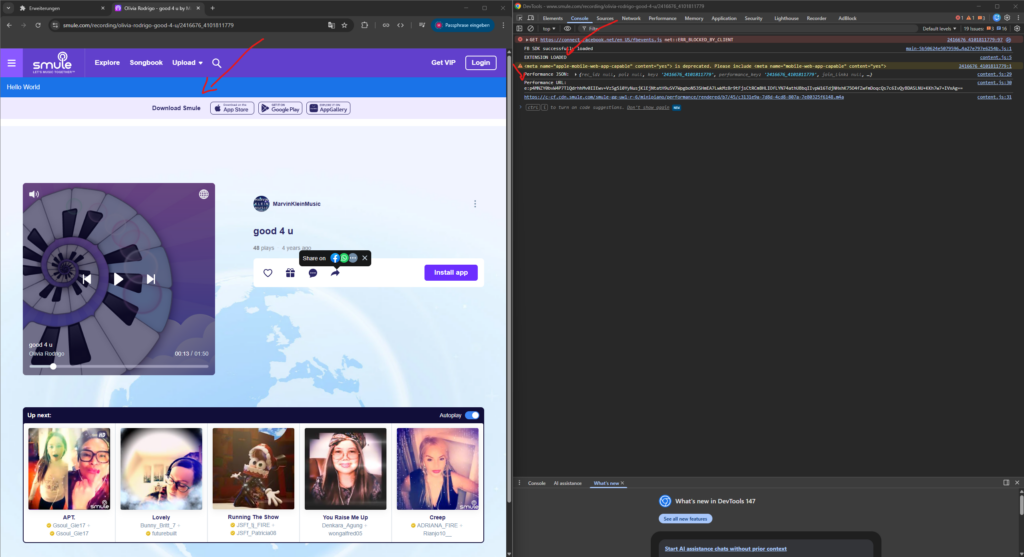
Extension prototype in Google Chrome
As you can see, it injects a blue bar into the Smule website and already fetches the performance data, along with the download link.
In addition, I already have a working prototype for Safari, which works on both macOS and iOS.
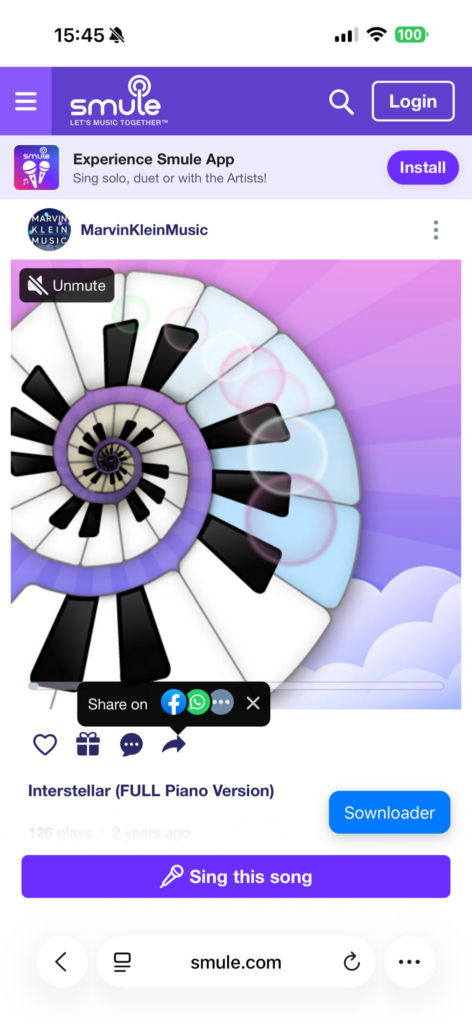
Safari iOS prototype
Here you can see that the extension injects a floating Sownloader button into the webpage. When you click on it, it starts fetching the performance data and lets you download your performance as audio or video.
I’m planning on releasing official extensions for all major browsers:
Google Chrome
Edge
Mozilla Firefox
Safari
I wasn’t able to test it on a real Android device yet.
As mentioned in our blog post from last December, we are going to update Sownloader Web to get it partially working again. These changes have now been implemented, and you can download your recordings again.
On PC, you’ll need to right-click the download buttons and choose “Save link as…” from the context menu. On mobile, it’s a bit more complex. On iOS, you’ll need to tap the download button and then go to Share → More → Save to Files.
I have added dedicated sections for this in Sownloader’s FAQ.
In addition to these changes, the following features have been dropped because they rely on our servers to download the performance first:
MP3 downloads (use audio m4a instead)
Setting the performance title as default filename
Moreover, I have done some housekeeping on the website. The profile downloader has been fully removed because it has been disabled since the last major ban wave back in 2020. The FAQs for Sownloader Web have been updated to reflect the latest changes. The default page for Sownloader has also been adjusted: the recent downloads section has been removed, and I have rearranged the content and made the FAQ more prominent. Lastly, I have updated the blog section of the website with a new theme.
Hello everybody, and welcome to 2026! I hope you had fantastic holidays. As mentioned in my last post of 2025, I took a few days off to celebrate the holidays with my family.
Now I’m back at working on the native Sownloader iOS app. In todays blog post I want to give you a first glance at sharing video and audio from the app.
I also did some improvements to the performance fetcher which now automatically hides the keyboard and clears the input field on focus.
Sadly my vacation is ending today so I cannot spent as much time on the app now as I want. So don’t expect daily blog posts. I try to keep you updated once a week.
In today’s blog post, I want to give you a first look at video playback in the native Sownloader iOS app. Please take a look.
What’s left todo?
There is quite some stuff todo before we can release the first version of the app.
Implement audio playback screen
Implement share sheet for media files
Add support for audio/video playback in iOS control center
Apply cover art and meta tags to media files
Provide localized files for German & English
Apply app icon
Small tweaks for better user experience
This will be the last development update for now. I’m going to take a few days off to celebrate Christmas with my family. Once the Christmas holidays are over, I’ll get back to the app and start implementing the audio playback screen.
In our last blog post, I shared details about the current situation and the future of Sownloader. If you haven’t read it yet, I recommend checking it out first for full context.
Today, I’d like to give you a small update on the current development progress. So far, I’ve finished the fetching and downloading part. It currently supports both audio and video. For each download, you can specify a custom name, which defaults to the song title. Please take a look on this short video.
Next, I’m going to work on the library view to replace the current demo player with a real implementation, which can also be triggered from the search feature.
Once this is done, I’ll try to automatically apply the corresponding metadata tags to the files after downloading them.
As you can see, we’re making great progress with the app so far. Keep an eye out for future updates.
in this post I would give you more details about the current situation regarding the availability of Sownloader and it’s future. You may have noticed that our service is no longer working anymore.
The reason for this comes down to the high popularity of our service. You guys have been downloading so many songs that our web server has generated so much traffic to Smule’s servers that it has been blocked by Smule’s Cloudflare protection.
This already happened in 2020 with our metadata fetching mechanism. At the time, we were able to resolve the issue by fetching the metadata via an external Raspberry Pi at my home. We tried the same approach this time for the actual content, and it worked at first. However, it again generated so much traffic that it literally killed my Raspberry Pi in just a few hours.
To give you some numbers, over 86 TB of media has been downloaded in the past 30 days alone. In September, Sownloader set its all-time record with over 690,000 unique visitors. In addition to this people have been using AI Agents to download their entire Smule catalog with Sownloader (which is actually crazy to think of).
Which options do we have?
The data clearly shows an upward trend that is far too much to be handled by a small Raspberry Pi hosted on my home network. Unfortunately, there’s no quick fix in sight.
A quick fix would be to switch to a different server provider, which would get the service running again in no time. However, this would only be a temporary solution, as it could easily be blocked again—most likely automatically. Additionally, we don’t want to generate terabytes of traffic from a single server, so we have to look for an alternative.
Sownloader Windows
Our native Windows application is completely unaffected by this, because you download the files directly from your own computer rather than from our servers. As a first step, we are going to release an update very soon to upgrade it to the latest .NET 10 release. Feel free to submit feature requests and bug reports directly on GitHub.
Sownloader Web
We are going to release an update shortly that will at least allow you to download your songs in some form. Unfortunately this changes come with some limitations.
We can no longer provide a default file name
MP3 downloads won’t be possible. Only m4a and mp4
m4a files cannot be saved on iOS
We can no longer provide these features, as they all rely on our servers downloading the content in the first place.
What are we going to do?
The only real solution to this problem is to provide native applications for all major platforms. But this will require some time.
According to our Google search data, the majority of our users are using Sownloader on mobile devices, which is why we are starting with those.
As a first step, we will start with a native iOS application. The reason for this is quite simple: I use iOS myself, and at the moment I don’t own any Android devices to test the app on.
I will use the current donations and income from Patreon to buy a cheap Android phone once the iOS app has been finished. The major challenge in providing native applications is the need to learn new programming languages. For iOS, I need to learn how to code in Swift, and for Android, I need to learn Java. In addition to this, I also need to learn how to use their integrated development environments (IDEs) before I can even start to code in them. Please also keep in mind that I’m doing all of this in my free time alongside my full-time job.
First look on the native iOS app
I already did some initial work to get familiar with iOS and Swift development. Right now I have a bare bone prototype which supports downloading files, searching them and playing them. Please take a look on this short video for a first impression.
Which features will the app support?
To get somewhere started I have defined some core features which will be part of the first version of the app.
Downloading via URL just like Sownloader Web
Searchable library of your downloaded songs
Play and share your media from the app
Renaming files
Deleting files
Tutorial on how to download your media
Which features will come in later versions?
These features will be implemented later on and won’t be available at launch.
Setting meta tags like artist, title, year, etc.
Automatically setting cover arts
Library shuffle play
Share directly from any Smule app to Sownloader
Mark as songs as favourite
Additional features and wishes
Do you have any features in mind that you’d like to see added to the app? Don’t hesitate to leave a comment below or contact us via email at support@sownloader.com
Lastly, I would like to thank everyone who has supported the project over the past 13 years through donations, contributions, feedback, or any other form of support. It’s crazy to think about the impact Sownloader has had on the Smule community over the past decade. I never thought that this project would become this big one day.
This is not the end of the world—it’s just the beginning of a new journey for Sownloader. I will keep you updated as soon as I can share more details with you! ♥️
We have some exciting news to share! Sownloader is now on Patreon, offering you a direct way to support the project and ensure its continued development.
Unlike traditional subscription models, supporting Sownloader on Patreon doesn’t come with exclusive benefits or perks. Instead, it’s a straightforward opportunity for you to contribute to a tool that has become an integral part of your music experience.
Here’s why your support on Patreon matters:
Sustain the Project: Your contribution goes directly towards supporting the development, maintenance, and improvement of Sownloader. It ensures that the tool remains accessible and functional for users like you.
Ad-Free Support: By supporting Sownloader on Patreon, you’re actively helping keep the tool free from ads. This means a cleaner, uninterrupted experience for everyone who relies on Sownloader for their music needs.
Community-Powered Growth: Sownloader has thrived because of the support of its community. Your contribution on Patreon helps cultivate a strong and engaged user base, fostering an environment where everyone benefits from the tool’s continuous evolution.
We understand that not every project needs exclusive perks, and Sownloader’s focus is on remaining a free and open tool for all users. Your decision to support Sownloader on Patreon is a vote of confidence in the project’s value and its role in the music community.
Visit the Sownloader Patreon page today and make a difference by supporting the project. Every contribution, no matter how small, plays a crucial role in sustaining Sownloader for the long term.
We upgraded from a Raspberry Pi 3 to a Raspberry Pi 4 today. The older Pi is now removed from the network after 8 years. The update should make Sownloader even more stable and faster. There may be some minor downtime under certain circumstances. We apologize for this!
The long wait is finally over! Sownloader 9 is out now! With this major update, almost every component of Sownloader has been reworked. You will feel noticeable differences in performance, downloads and stability.
The key point of this update is the move to .NET 6, which means we are officially ending support for Windows XP and Vista. Furthermore, we have also replaced the integrated Firefox with the new WebView2 from Microsoft.
In addition, this update fixes the URL search, which has not worked since an update of the Smule website. All versions below version 9 are therefore no longer functional, so every user should install this update.
This are all changes in this release:
+ Added WebView2 Webbrowser
+ Added Sownloader URL detection 3.0
+ FFmpeg is now included directly and does not need to be downloaded manually
+ Downloading a video as M4A does not longer require the file to be converted
+ Sownloader will now detect when the performance needs to rendered by Smule first and sends automatically a request to initiate the render progress
~ Converter has been minified. It now requests the output file on click on start converting.
~ Settings are now being stored in appdata within a XML file
~ Updated icons
~ The UpdateSearch has been updated to use HttpClient instead of obsolete HttpWebRequest
Fixed Clipboard functionality not working in certain cases
Fixed Sownloader was unable to find any performance URLs
Removed GeckoFx WebBrowser
Removed option “Video Size” from settings
Removed ID3Tag window. Sownloader sets the meta tags automatically from now on
Removed Mozilla Public License from GeckoFX
Since this is a new major release, you may encounter problems when updating, so we recommend downloading version 9 once manually.
If you encounter problems with the new version, you can either open an issue on Github or send us an email to support@sownloader.com.