Author: MarvinKleinMusic

  • Sownloader Version 9 BETA

    As some of you might have noticed, the desktop app has not been working for the last few months because of changes to the Smule website. In addition, the source code for the desktop app was a few years old and needed some major improvements. That’s why it took us so long to update Sownloader to version 9. Only the update search and the automatic update have to be migrated to version 9 so that we can finally release the long-awaited update.

    Before we ship this release we want to invite you to test our latest beta build which can be downloaded here: https://sownloader.com/Sownloader9-BETA.zip

    Please create an issue on GitHub when you are experiencing any issues with this beta release.

    Sownloader 9 has some major improvements! First of: We’ve got rid of the .NET Framework. The app is now a native .NET 6 app. This results in much faster performance, less memory usage and many new possibilities. Due to these major changes, we are discontinuing support for Windows XP and Windows Vista immediately. If you want to check if your PC can run .NET 6, please checkout this official post from Microsoft.

    Another major change is the removal of the GeckoFX webbrowser. Instead we are now using the Microsoft WebView2 based on Chromium.

    There are also other quality of life improvements. For example, Sownloader now automatically sends a request to the server for rendering when the software detects that the performance has not yet been rendered. Moreover, videos do not need to be converted to m4a files anymore. Sownloader will now download the audio instead.

    The form to insert meta tags has been removed as well. Sownloader can now fill in this information completely automatically based on the performance itself.

    Sownloader is now on GitHub

    Our desktop version of Sownloader is now available on GitHub. We did this to maintain this project more easily and to get your requests and issues in one place. Feel free to contribute to the repository.

    Roadmap for the desktop app

    Once version 9 has been released we will start working on new features for the desktop app. Right now we have 3 features in mind. Please let us know which of these features is most important for you.

    • Add an option to generate filenames based on values from the performance (e.g. {artist}_{titlte}.m4a)
    • Add the profile downloader from Sownloader Web to download your entire profile at once
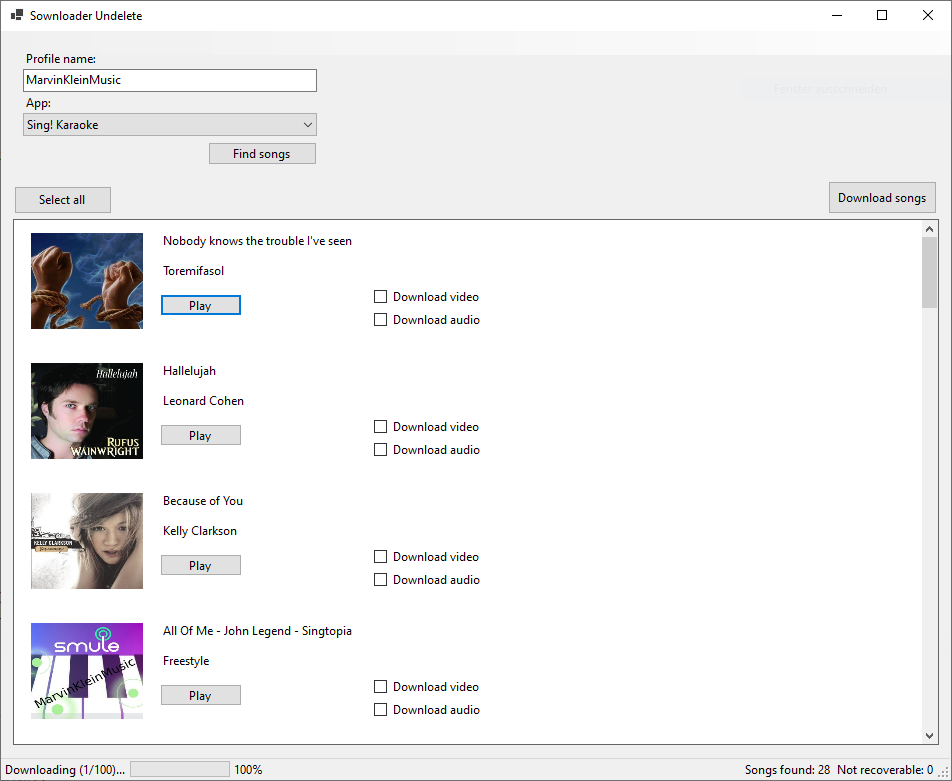
    • Add Sownloader Undelete. This tool can download some recently removed/deleted public songs from your profile before they will be deleted completely from the Smule servers.
  • MP3 downloads are out of beta

    After three long years, MP3 downloads are no longer in beta.

    With today’s update the last problems with MP3 downloads have been fixed. For many people it was very confusing that the page had previously only loaded forever. Therefore, many aborted the process at this point and started again.

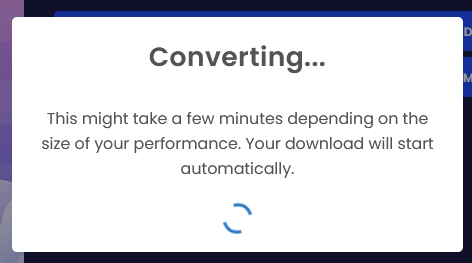
    From now on, when you click on Download MP3, a new popup will open, informing you that the recording is still being converted. The download process starts automatically.

    New converting popup

    If you still experience any problems when downloading MP3 files, please contact us via email at support@sownloader.com

  • Stability improvements for Sownloader Web

    Today we have updated Sownloader Web with various improvements in server stability. Some of you may have noticed that Sownloader does not work all the time. This has todo with DNS caching issues when the domain grabbing server restarts every day.

    Our server needs some time to update the DNS addresses that are already in the cache. Depending on the time of the restart, this can take up to several hours. With today’s update, we read the DNS records directly via API, so we are no longer dependent on the DNS server. This should drastically reduce downtime.

  • Update of Sownloader.com

    The Sownloader website was updated today to improve it even further. We have updated all core files to the latest version of PHP 8. In addtion we fixed some minor issues which led to issues with our downloading software.

    Moreover we have added another error message which gets displayed when a performance was found but has not been rendered by Smule yet. Every performance needs to be rendered first before it can be downloaded. The implemented error message holds a link to the performance with exact instructions what the user needs to do, to download the song.

  • Sownloader Development Update – Dezember 2020

    In out last blog post, we have shared with you a sneak peak about the upcoming Sownloader Undelete for Windows 10. If you haven’t read this post yet, you can do it right here: https://sownloader.com/news/2020/12/12/sneak-peak-of-sownloader-undelete/

    As some of you probably know, Sownloader hasn’t been a web application since the beginning. Originally, Sownloader appeared in 2014 as a native app for Windows. This version has got many new features over the years, like converting to MP3 and writing meta data. The last major update for this version was released on the 3rd September 2019. Since that day only minor bugfix updates have been released.

    This will change in near future. I’ve been working on an all new version – Sownloader 9.

    What is changing in Sownloader 9?

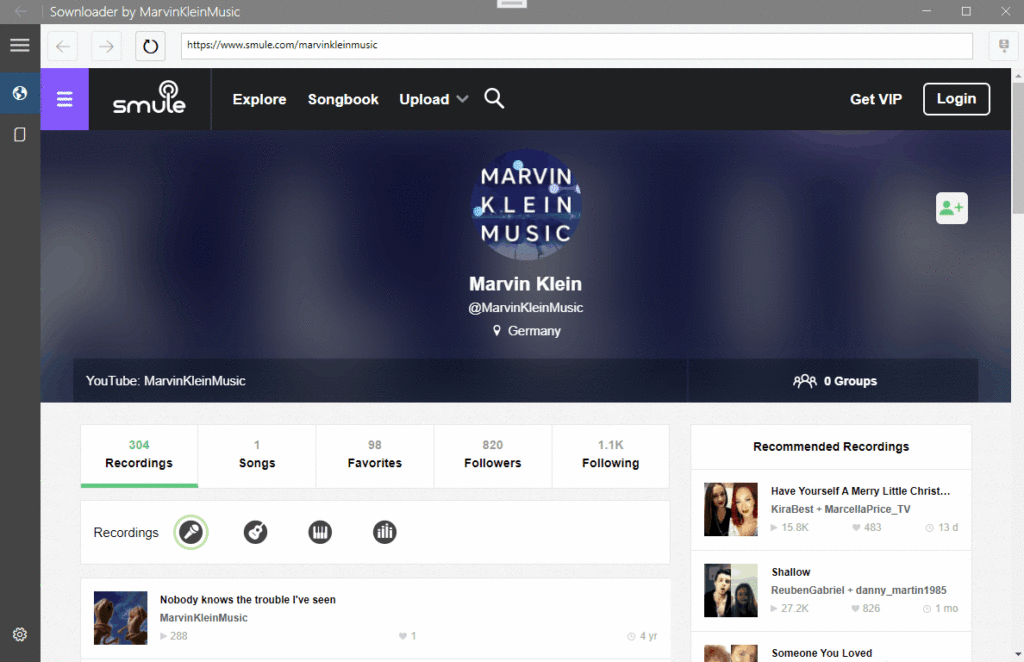
    There a many major difference between Sownloader 8 and 9. The biggest one is the all new Metro theme which fits perfectly into Windows 10. Here is a first look at the new user interface.

    With this update we are dropping the support for Windows 7. The reason for this is quite simple. Sownloader has been rewritten in .NET 5 which is not available for Windows 7 anymore. Since the 14th January 2020, Windows 7 does not get any security updates from Microsoft anymore. If you still running Windows 7, you should update to Windows 10 as soon as possible.

    Sownloader Undelete will be integrated in this new version. We are going to add the Sownloader Profile Downloader in the future as well.

    With Sownloader 9 we are replacing the old Firefox browser with the latest version of Microsoft Edge running on Chromium. It is much faster than the old version of Firefox, Sownloader is currently using.

  • Sneak peak of Sownloader Undelete

    In todays blog post I want to give you a sneak peak of the upcoming Sownloader Undelete. As some of you might know, deleted performances are not deleted directly. They are restoreable for a limited time until they actually get deleted.

    A few months ago we hosted a service on Sownloader.com which let the user restore those songs. Because of its popularity we had to disable this service for an unknown period of time. The major problem with this service is that it generates a lot of requests to the official Smule server. When our server sends a lot of request within a short period of time to the official Smule servers then we get blocked by their spam protection and Sownloader won’t work for all of our users.

    To wipe out this problem I’ve started working on a brand new tool called Sownloader Undelete. It will be far more powerful than our original undelete service.

    Which features will be supported?

    • Audio and video recover for Sing! Karaoke, Magic Piano, Guitar, and Autorap
    • Automatically rendering of non rendered Smule performances
    • Meta data support, such as artist, cover art, etc.
    • Auto download all performances as either video, audio, or both
    • Preview the performances

    Which features won’t be supported?

    • Does not run on Mac, Android, iOS, or Linux. It only runs on Windows 10
    • MP3 converting (might be added with an update later)

    How can I influence the development?

    I’m still not sure about a naming convention for the downloaded songs. What kind of information do you need in the filename? Please feel free to either write a comment under this post or send an email to support@sownloader.com with your naming requirements.

    How does it look?

    Here is a screenshort from early development. It might change in the final version.

  • Upcoming update of Sownloader.com

    Hi everyone,

    Today’s update post goes a bit deeper into the technical direction. A big change for our service is imminent. Since the Sownloader 2014 was released as a webapp, we have constantly added new features to the service. But there was always a problem until now. Due to our server provider we were forced to build the service based on PHP. Unfortunately, I have to admit that I program predominantly in .NET and therefore some functions take much longer than I originally planned.

    Thanks to your numerous donations I have rented a new server which allows me to develop in my familiar environment with ASP.NET Core. This server has already been rented for 1 year and Sownloader will move to it as soon as I have converted the current version to ASP.NET.

    What are the advantages for you?


    First of all, new features can now be programmed much faster. In the first step the following changes to Sownloader are planned:

    1. implementation of a progress indicator for the conversion to MP3
    2. the profile downloader is drastically improved More about this in a later blog post (the changes will blow your mind)
    3. implementation of Sownloader Undelete. This service can restore deleted recordings from Smule after a certain period of time.

    More information will follow at the end of November. But I give the programmers among you a final tip.

  • Sownloader Profile Downloader

    Hey everyone,

    today I have some exciting news to share with all of you.

    Surely you have already noticed that Smule has deleted many recordings within the last days due to copyright violations. Most probably many of you will now save their songs with Sownloader. Depending on how long you have been a part of the Smule community, you may have collected several 100 recordings.

    If you want to download them with Sownloader, you have to download each of them individually. This will soon be a thing of the past! I am happy to announce that Sownloader will get a new feature which will make it possible to download all recordings from one profile. You can individually select the songs by app and directly download them with Sownloader.

    The following videos show a techdemo from the development, how I load the data of 206 songs with Sownloader.

    Sownloader Profile Downloader – Tech Demo
    Tech Demo 2

    By now I can’t say when the feature will be available, but I will keep you informed.

    -Marvin Klein

  • Minor improvements

    Hey everyone,

    In today’s blog post I would like to talk about minor improvements of Sownloader Web. SCWID has pointed out to me that Sownloader Web is unable to download your performance, when the performance name contains a # character. This issue has been fixed with todays patch.

    Moreover, I implemented more security features to Sownloader Web. Those are necessary to prevent other sites from using our downloader Software as their own creation.

    That’s all for todays update post. Keep an eye out for an upcoming update of Sownloader Windows.

    Best

    Marvin Klein

  • Sownloader.com update

    Hello everyone,

    Last week I already gave you an outlook on upcoming features in 2020. If you haven’t read the blog entry yet, you can catch up on it right here.

    Today I uploaded a big update to Sownloader.com. It contains many improvements and bugfixes. The most important change is the design of Sownloader Web. This has been greatly improved to create a better overview.

    Further changes:

    • MP3 Downloads are now available for mobile devices
    • MP4 and M4a downloads are available on mobile devices without any third-party software
    • Added 404 Page
    • Changed the design of the MarvinKleinMusic Favourites page
    • MarvinKleinMusic Favourites can now be sorted by category
    • “About Us” has been revised and is now called “About Me”
    • “Changelog” renamed to “Updates”
    • Sownloader updates are now displayed as timeline
    • Footer now contains two new buttons “Get Help” and “Report Bug
    • Removed Twitter widget from the footer
    • Help has been renamed to FAQ and is now accessibile in the footer
    • Display of the FAQ slightly adapted
    • Fixed an error when capturing a download from Sownloader for Windows
    • Fixed an error in the calculation of the display in the statistics, which caused 0 values to be displayed at the beginning of the month

    Since this is a relatively large update, I would ask you to contact me by e-mail in case of problems.

    support@sownloader.com

    Best,

    Marvin