In today’s blog post, I want to give you a first look at video playback in the native Sownloader iOS app. Please take a look.
What’s left todo?
There is quite some stuff todo before we can release the first version of the app.
Implement audio playback screen
Implement share sheet for media files
Add support for audio/video playback in iOS control center
Apply cover art and meta tags to media files
Provide localized files for German & English
Apply app icon
Small tweaks for better user experience
This will be the last development update for now. I’m going to take a few days off to celebrate Christmas with my family. Once the Christmas holidays are over, I’ll get back to the app and start implementing the audio playback screen.
In our last blog post, I shared details about the current situation and the future of Sownloader. If you haven’t read it yet, I recommend checking it out first for full context.
Today, I’d like to give you a small update on the current development progress. So far, I’ve finished the fetching and downloading part. It currently supports both audio and video. For each download, you can specify a custom name, which defaults to the song title. Please take a look on this short video.
Next, I’m going to work on the library view to replace the current demo player with a real implementation, which can also be triggered from the search feature.
Once this is done, I’ll try to automatically apply the corresponding metadata tags to the files after downloading them.
As you can see, we’re making great progress with the app so far. Keep an eye out for future updates.
in this post I would give you more details about the current situation regarding the availability of Sownloader and it’s future. You may have noticed that our service is no longer working anymore.
The reason for this comes down to the high popularity of our service. You guys have been downloading so many songs that our web server has generated so much traffic to Smule’s servers that it has been blocked by Smule’s Cloudflare protection.
This already happened in 2020 with our metadata fetching mechanism. At the time, we were able to resolve the issue by fetching the metadata via an external Raspberry Pi at my home. We tried the same approach this time for the actual content, and it worked at first. However, it again generated so much traffic that it literally killed my Raspberry Pi in just a few hours.
To give you some numbers, over 86 TB of media has been downloaded in the past 30 days alone. In September, Sownloader set its all-time record with over 690,000 unique visitors. In addition to this people have been using AI Agents to download their entire Smule catalog with Sownloader (which is actually crazy to think of).
Which options do we have?
The data clearly shows an upward trend that is far too much to be handled by a small Raspberry Pi hosted on my home network. Unfortunately, there’s no quick fix in sight.
A quick fix would be to switch to a different server provider, which would get the service running again in no time. However, this would only be a temporary solution, as it could easily be blocked again—most likely automatically. Additionally, we don’t want to generate terabytes of traffic from a single server, so we have to look for an alternative.
Sownloader Windows
Our native Windows application is completely unaffected by this, because you download the files directly from your own computer rather than from our servers. As a first step, we are going to release an update very soon to upgrade it to the latest .NET 10 release. Feel free to submit feature requests and bug reports directly on GitHub.
Sownloader Web
We are going to release an update shortly that will at least allow you to download your songs in some form. Unfortunately this changes come with some limitations.
We can no longer provide a default file name
MP3 downloads won’t be possible. Only m4a and mp4
m4a files cannot be saved on iOS
We can no longer provide these features, as they all rely on our servers downloading the content in the first place.
What are we going to do?
The only real solution to this problem is to provide native applications for all major platforms. But this will require some time.
According to our Google search data, the majority of our users are using Sownloader on mobile devices, which is why we are starting with those.
As a first step, we will start with a native iOS application. The reason for this is quite simple: I use iOS myself, and at the moment I don’t own any Android devices to test the app on.
I will use the current donations and income from Patreon to buy a cheap Android phone once the iOS app has been finished. The major challenge in providing native applications is the need to learn new programming languages. For iOS, I need to learn how to code in Swift, and for Android, I need to learn Java. In addition to this, I also need to learn how to use their integrated development environments (IDEs) before I can even start to code in them. Please also keep in mind that I’m doing all of this in my free time alongside my full-time job.
First look on the native iOS app
I already did some initial work to get familiar with iOS and Swift development. Right now I have a bare bone prototype which supports downloading files, searching them and playing them. Please take a look on this short video for a first impression.
Which features will the app support?
To get somewhere started I have defined some core features which will be part of the first version of the app.
Downloading via URL just like Sownloader Web
Searchable library of your downloaded songs
Play and share your media from the app
Renaming files
Deleting files
Tutorial on how to download your media
Which features will come in later versions?
These features will be implemented later on and won’t be available at launch.
Setting meta tags like artist, title, year, etc.
Automatically setting cover arts
Library shuffle play
Share directly from any Smule app to Sownloader
Mark as songs as favourite
Additional features and wishes
Do you have any features in mind that you’d like to see added to the app? Don’t hesitate to leave a comment below or contact us via email at support@sownloader.com
Lastly, I would like to thank everyone who has supported the project over the past 13 years through donations, contributions, feedback, or any other form of support. It’s crazy to think about the impact Sownloader has had on the Smule community over the past decade. I never thought that this project would become this big one day.
This is not the end of the world—it’s just the beginning of a new journey for Sownloader. I will keep you updated as soon as I can share more details with you! ♥️
today I want to share some important information about the Sownloader service with all of you. According to a bug on the official Smule website, Sownloader is no longer able to find any performance URLs. Right now their page is not compatible with any version of the Internet Explorer. All versions of Sownloader – except for the very first one – use the Internet Explorer as browser engine because it was built in Visual Studio (the development environment).
The main problem on Smule’s website is some incompatible JavaScript, which works fine in other browsers, but Internet Explorer cannot handle it.
I spent the last week on working for a patch to fix this issue. In the future Sownloader will no longer use the default Internet Explorer. Instead Sownloader will work with a built in Firefox engine (GeckoFX). This big update will be available within the next week. There are only three major things that are not finished yet.
Furthermore the update takes the Sownloader desktop environment to a whole new level. It will feature a brand new design, tons of bugfixes, and many more improvements. Most important is the switch of the coding language from VB.NET to C#. You will not believe how fast this version is!
Meanwhile you can download all your media with the Sownloader Web service. If you need your performances as mp3, you can convert them afterwards with the built in converter in Sownloader. You can find the converter in Sownloader right here: Menu->Extras->Converter.
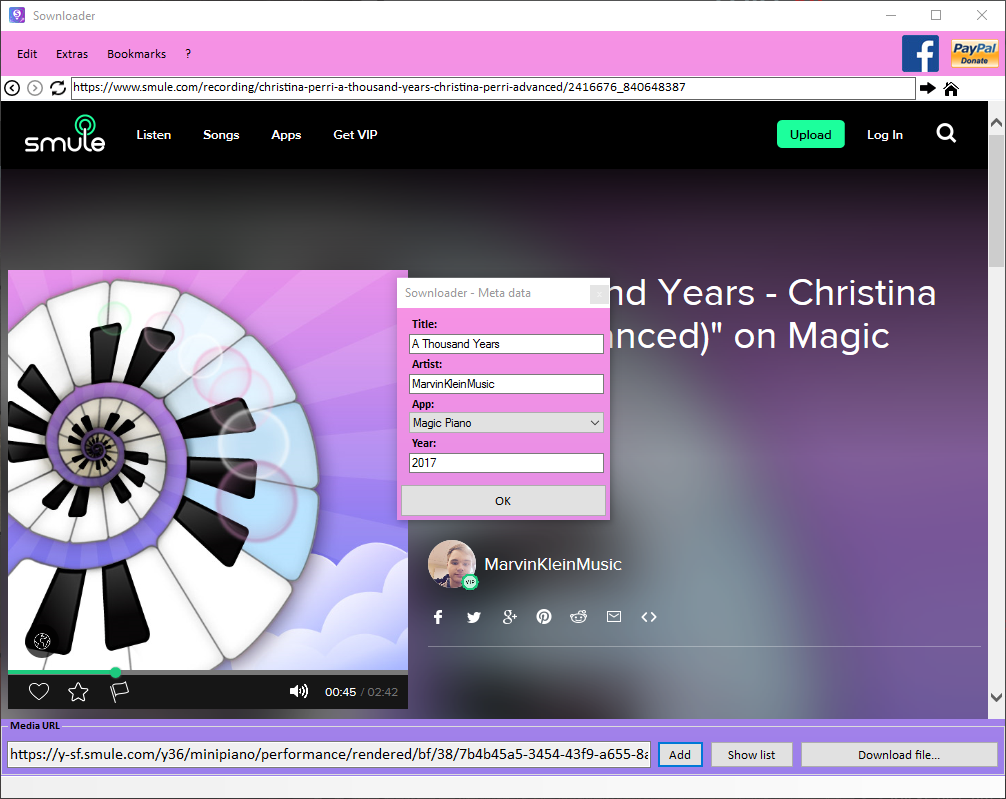
Sownloader 7.1 is now available for everyone. This is another major update for Sownloader 7 which has been released just a month ago. It brings back another Sownloader feature from the past, ID3Tag customization. We removed this feature earlier because of regular changes on the Smule website. This version of Sownloader makes it even easier to customize all your media files, it adds another form which will pop-up if you are saving a file. Actually we support the following ID3Tags:
Title
Year
Album/App
Performer
Keep in mind that each ID3Tag is limited to 32 Chars. In addition, we give you the option to turn off this pop-up and to generate the year automatically. The next big release will contain better support for default ID3Tags and for automatic ID3Tag detection.
Full Changelog:
[General]
+ Added ID3Tag form
+ Added new option to turn off the automatically add of the current year
+ Added sownloader certificate
~ Updated User-Agent to Mozilla/5.0
# Fixed wrong save path initialization for new users
# Fixed positioning of forms
# Fixed a grammar mistake in program description
[Sownloader.log]
+ Added elapsed time for update search
[Layout]
+ Added background gradient to licenses
~ Groupbox labels to Calibri 9pt, bold
~ Changed button fonts to Calibri 10-12pt
~ Sharper text for menus and buttons
~ Changed all types of fonts to “Calibri”
The first big update of 2017 is now available for Sownloader. This update adds multi-thread support and improves many small details in the software. In addtion to this, I have added many more performances to “MarvinKleinMusic favourites” which can be found in the menu at “Extras”. The biggest new feature in this update is definitely the multi-thread support, it allows Sownloader to use different threads on your computer to handle more tasks at the same time.
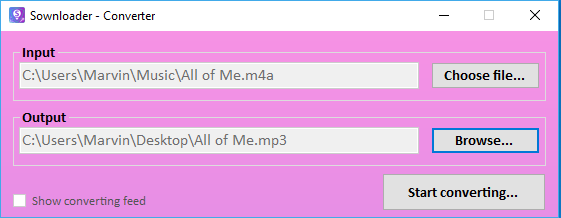
Another new feature is the converter which can be found in menu “Extras”. This is just a small tool which allows you to convert media files from your computer to either .mp3 or .m4a.
Sownloader 7 – Converter
The converter supports the following converting methods:
.mp4 to .mp3/.m4a
.m4a to .mp3
More options will be included in future releases
Sownloader 7 logo
Changelog:
[General]
+ Added new setting to config.ini
+ Added update search to menu
+ Added MarvinKleinMusic favourites to “Extras”
+ Added converter to Sownloader
+ Added social media buttons to about
+ Added shortcuts for Update search, Settings, Help, News, MarvinKleinMusic favourites & Tag Editor
+ Added licenses form
~ Updated copyright information
~ Changed donation currency from Euro(€) to USD($)
# Fixed the skipVersion command in Sownloader main form
# Fixed error while starting Sownloader
# Fixed security issues
# Fixed an issue with the config.ini
# Fixed progressbar in statusstrip
[Website]
~ Updated favicon icon
# Fixed help section
[Layout]
+ Added new icons to menu
+ Added new logo
+ Added new loading screen
~ Updated fonts for menus and buttons
# Fixed flickering of tab control in settings
# Fixed grammar mistakes in labels and menus
# Fixed position of each form
# Fixed wrong autofocus in main form and settings.
– Removed background gradient in settings
[Sownloader.log]
+ Added error reporting for Tag Editor
~ Updated Sownloader.log error reporting
[Converting]
+ Added multi-thread support
# Fixed freeze while converting a song
# Fixed audio quality of converted mp4 files
# Fixed converting crash with files that contains a blank space
[Supdater]
+ Added Supdater 1.2 to Sownloader
+ Added button to start Sownloader after updating
~ Updated copyright information/description
[Tag Editor]
# Fixed layout issues in the Tag Editor
# Fixed System.IndexOutOfRangeException in Tag Editor
[MarvinKleinMusic favourites]
+ Added one MarvinKleinMusic favourite video performance (great performance Adrian & Chanticleer!)
+ Added three Magic Piano songs to MarvinKleinMusic favourites
I recognized that some people are using adfly links to link my software on different platforms. These are mostly marked with a kind of “support” label to support the development of Sownloader. But this is not true. Sownloader does not use any adfly links. I have different reasons why I don’t use the adfly service.
Sownloader is a non-profit software
Advertisements on adfly can contain viruses for your PC or other devices
I don’t want to earn money with this project. Sownloader was developed for all users who want to download and save their media for future enjoyment and for those who want to share their memories with family and friends. I’m just a Smule user who wants to offer a better experience for all Smule products. Furthermore, by developing this software I am able to save my memories as well. Sownloader will never be for profit and you will not see any types of advertisements on my website or Sownloader itself. Earlier this year I decided to enable donations for Sownloader to manage the server and domain fees (https://sownloader.com/news/2016/04/06/usage-of-donations/).
Security to you and to the Sownloader site is of utmost importance. Any advertisements on adfly can contain viruses or trojans which are a risk to you. Please do not click on any of these external links or advertisements.
If you find any adfly links which directs you to Sownloader, please report them to our support email, with the URL, and where you found it.
support@sownloader.com
Best,
-Marvin
Update (28.10.2016):
The first adfly links which redirect the user to the Sownloader services were blocked.
Hi, my name is Adrian and I’m living with Pancreatic Cancer.
Starting a GoFundMe was never something I felt comfortable doing, however, after my friends demanded I comply or else suffer embarrassing consequences here I am to tell my story…
In the fall of 2014, after suffering in silence with painful stomach issues for months, I finally bit the bullet and saw my doctor. Two agonizing months later I was diagnosed with Stage 4 inoperable Pancreatic Cancer and given 2 years to live!
I’ve always been a person who avoids anything once it gets stressful but something in me switched on. The usually quiet, anxious and shy Adrian suddenly became laser focused! I was determined to do all I could to:
1. Beat the terrible odds of Pancreatic Cancer by seeking out every possible avenue to ensure I would prove my Oncologist wrong
and
2. If all I have left is 2 years then they’re going to be my best years
Today, after 15 rounds of the strongest chemo out there (and the cancer spreading to my liver) then switching to a study that involved Immunological therapy plus 6 more rounds of chemo I’m healthier than I was when I was diagnosed. As of my last scan in September 2016 the lesion in my liver has disappeared, my pancreatic tumor has shrunk by 6% and my cancer markers are almost down to those of a normal person!
My oncologist has also given me another two years! 🙂
I feel so lucky and blessed! I have all my hair, I’m not in pain and I look the picture of health while 80% of pancreatic cancer patients don’t make it to their one year anniversary. I’m not sure why I’m still here, but I think it has to do with the outpouring of love, prayers, positive intentions and support that I’ve received from my friends; most of whom I’ve never met in person.
– Let me explain that one 🙂
I discovered a Karaoke app called Sing! Karaoke by Smule. Basically you sing into your smartphone and you can record video duets with people from all around the world. (You may have seen my friend Thomas Bleasby’s viral video he made on the app last year with Jesse J). On my chemo days I would come home from the cancer clinic after a 6 hour session of chemotherapy with an infuser bag attached to me holding another 46 hours worth of chemotherapy drugs and just start singing into the app. The first few songs would be horrible and I’d usually delete them but after a while the endorphins and dopamine would kick in and I’d end up singing with my online friends – sometimes till 5 am! I don’t know what I would do without the app and those late night duets but luckily I’ll never have to find out.
Now that my cancer is stable and the chemo portion of my treatment has ended, I’ve been given permission to travel. For as long as I am physically able, my dream is to travel the world and sing with as many of my Sing! friends in person as possible. I’ve created a YouTube account called Adrian’s Kancer Karaoke Therapy where I have uploaded all my favourite video duets. I’m also going to upload some of my personal video diaries that I created on Facebook Live and once I start meeting my online friends in real life I will upload them to my channel so you can all follow along with me on my journey.
So here goes!
Please share and If you would rather donate to a charity I recommend Pancan.org. Their mission is to double the 5 year survival rates of this horrible disease by 2020. Their slogan is Wage Hope and they truly were the first to give me hope that it was possible to beat the odds.
In this post I want to introduce you to Nikki Nemeyer. She’s one of the power users of Sing! Karaoke by Smule, and she has joined Smule back in September 2012. I interviewed her on Facebook, and I got really interesting answers from her, especially her cover with AdrianSings of Riptide (Vance Joy cover) by Taylor Swift blew my mind. It was an absolutely perfect cover – make sure to check it out! I already got to know her in April 2013 after I had joined the SINGTOPIA community group. Now she helps me with many things, for example having managed the last contests, creating images for this website and Sownloader, or her donations which keep this site alive for each Smule user. I want to thank you from the bottom of my heart, for all your hard work that you did in the last years Nikki! And for all your help and support. You are a wonderful person who inspires me to work even harder on my projects.
Another update for Sownloader is available today. The focus in this update is to fix some ugly bugs which are blocking the best user experience. Furthermore, the new update helps us to make Sownloader even better because we have updated the sownloader.log functionality. Here is the full changelog:
~ Updated sownloader.log functionally
~ Webbrowser is now usable while downloading
# Fixed an issue with the “Add” button
# Fixed an issue which happens if you download two small songs
# Sownloader won’t freeze anymore if converting crashes